Crawler Settings
You have set up the crawler to crawl your site or sitemap. If you are seeing unwanted or duplicate pages, or if crawling is taking too long, there is likely a crawler setting to help.
If pages are missing from your search results, see Index Troubleshooting.
Unwanted Pages
If your index contains pages you do not want in your search results, you have a few options depending on where those pages come from.
By default, crawling https://domain.com also crawls https://blog.domain.com and any other subdomains. To exclude subdomain pages, turn off the Crawl Subdomains setting.
To remove specific pages or documents from your search results without deleting them from your website, apply blacklisting, whitelisting, or no-index rules.
You can also hide an individual page from SS360 while keeping it visible in Google and other search engines. Add the following meta tag to that page:
<meta name="ss360" content="noindex" />
Whitelist, blacklist, and no-index URL patterns
The best method depends on your site structure and which pages or documents you want in your index.
URL and XPath patterns are interpreted as regular expressions. Put a backslash (\) before special characters such as []^$.|?*+(){}.
These settings only apply to content added via sitemap(s) and root URL(s). Pages pushed to the URL List and FAQ entries are indexed regardless of these rules.
How the rules work together
Blacklist, whitelist, and no-index patterns are applied together, not as alternatives. A page from a root URL or sitemap is indexed only when all of the following are true:
- It does not match any blacklist pattern.
- It matches a whitelist pattern (only enforced when you have set at least one).
- It does not match any no-index pattern.
When patterns overlap, priority runs blacklist → whitelist → no-index. Whitelisting and blacklisting stack: if you whitelist /blog/ to limit indexing to your blog and then blacklist /blog/drafts/, the crawler indexes your blog pages but excludes the drafts. When a URL matches both a whitelist and a blacklist pattern, the blacklist wins and the page is excluded.
These rules are re-checked on every re-index. If a page is already indexed and later becomes blacklisted, no-indexed, or (when a whitelist is set) no longer whitelisted, the next re-index removes it from your index.
Blacklist URL patterns
Blacklist patterns tell the crawler to completely ignore specific areas of your site or types of documents.
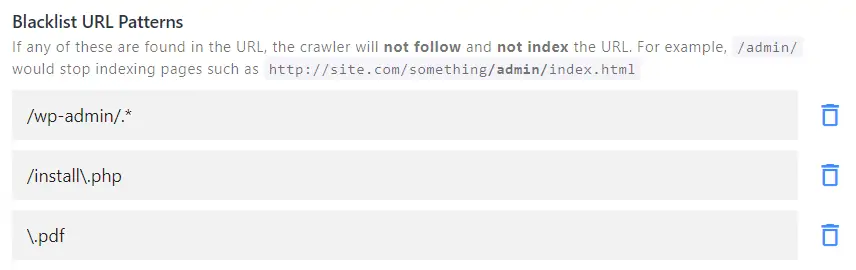
In this example, pages under /wp-admin/, .php pages, and PDFs will not be indexed. The crawler also will not follow any links found on those pages.
Click Fill Blacklist from robots.txt to populate the blacklist automatically from the disallow rules in your site's robots.txt file.
Blacklisting takes priority over whitelisting. If there is a conflict in your settings, the whitelisted patterns are ignored.
Whitelist URL patterns
Whitelist patterns restrict the crawler to a specific area of your site.
For example, to limit search to blog pages only, whitelist /blog/. The crawler will then only index URLs that contain /blog/.
This is also useful for multilingual sites. For example, you could use the following patterns to limit search to French-language pages only:
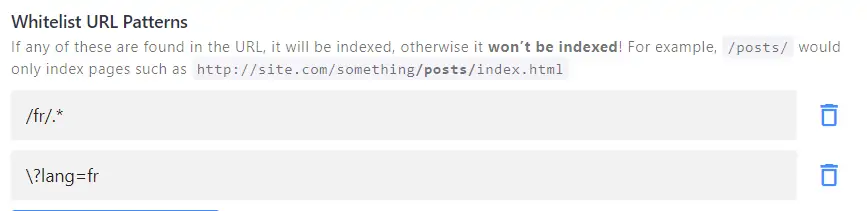
Make sure your root URL matches your whitelisting pattern (e.g. https://website.com/fr/). If the root URL does not contain the whitelist pattern, it will be blacklisted — which means nothing can be indexed and there will be no search results.
No-index URL patterns
No-index URL patterns behave like the noindex,follow robots meta tag. The crawler follows the page and its outgoing links, but does not include the page itself in the results.
This differs from blacklisting, where the crawler fully ignores the page without checking it for other useful links.
Use no-index patterns for pages that should not appear in search results but contain links to important pages — for example, excluding a Blog landing page while still indexing individual blog posts, or excluding tag pages while indexing the tagged content.
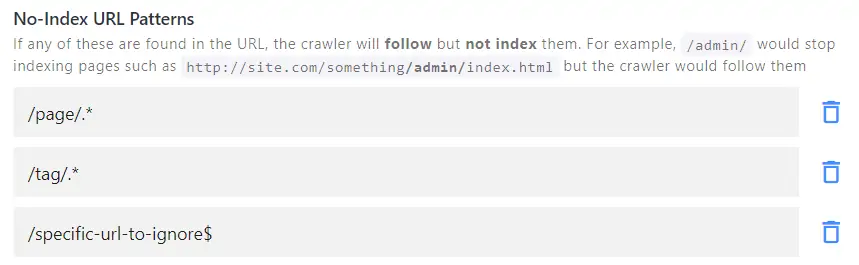
The $ sign in the pattern indicates where the match should stop. URLs that link from the excluded page — such as /specific-url-to-ignore/product1 — will still be followed, indexed, and shown in search results.
No-index URL patterns take priority over whitelisting. If there is a conflict in your settings, the whitelisted patterns are ignored.
No-index XPaths
Sometimes you need to no-index pages that do not share a URL pattern. Instead of adding every URL individually, check whether you can no-index them based on a specific CSS class or ID.
For example, if you have product category pages you want to hide from search results while still crawling the products, and those category pages contain a distinct element such as <div class="product-grid"></div>, you can add it as a no-index XPath:
//div[@class="product-grid"]

The crawler will visit the category pages, then follow and index all outgoing URLs — so your product pages will be indexed and shown in results.
Using many no-index URL patterns or no-index XPaths slows down indexing, because the crawler must scan every page and check it against all rules. If you are confident that a page or directory and all its outgoing links can be safely excluded, use blacklist URL patterns instead — it is faster.
No-follow XPaths
No-follow XPaths tell the crawler not to follow any links found inside a matching element, while still indexing the page itself.
This is the inverse of a no-index XPath: a no-index XPath excludes the page but still follows and indexes its outgoing links, whereas a no-follow XPath keeps the page in the index but stops the crawler from following the links inside the matching element.
Use this to keep the crawler out of low-value areas linked from an otherwise useful page — for example, a "related products" widget or a navigation block that points to pages you do not want in your index.
Whitelist XPaths
Whitelist XPaths restrict the crawler to specific pages that do not share a URL pattern.
For example, the following XPath limits search to Russian-language pages only:

Whitelist XPath takes priority over no-index XPath. If there is a conflict in your settings, the no-index XPaths are ignored.
Duplicate Pages
How can I remove duplicate pages?
If you find duplicate pages in your index, the following crawler settings can help.
Use Canonical URL
Canonical tags are a reliable way to avoid duplicate results in both your on-site search and in Google and other search engines. Learn more about the required changes on your side here.
For example, if these three URLs have identical content:
http://mysite.com/url1http://mysite.com/url2http://mysite.com/page1
Add the following tag to the first two pages to indicate that they point to the same canonical URL:
<link rel="canonical" href="http://mysite.com/page1" />
Once this is set up correctly on your site, turn on the Use Canonical URL toggle and re-index your site.
Ignore Query Parameters
If two URLs point to the same content but differ only in query parameters — for example:
http://mysite.com/url1http://mysite.com/url1?utm_campaign=google&sessionId=cb5q69wo5
The crawler treats them as separate entries. To consolidate them, turn on Ignore Query Parameters to strip URL parameters that do not affect page content.
Do not enable this setting if you use query parameters for any of the following:
- Pagination — e.g.
?p=1,?page=2 - Page identification — e.g.
?id=1,?id=2(not just sorting)
Ignoring all query parameters in these cases may cause the crawler to miss relevant pages. Consider these alternatives instead:
- Submit a sitemap with clean URLs and switch to Sitemap Indexing, which is faster and typically produces cleaner results.
- Add pagination to your no-index patterns (e.g.
\?p=) and blacklist other query parameter patterns under Blacklist URL patterns.
Lowercase All URLs
Before enabling this setting, confirm that your server is not case-sensitive. For example:
http://mysite.com/category/producthttp://mysite.com/Category/Product
Remove Trailing Slashes
Only enable this setting if the URLs with and without a trailing slash display the same page:
http://mysite.com/category/product/http://mysite.com/category/product
Replace Parts in URL
Replace Parts in URL rewrites URLs before they are indexed, using one or more pattern-and-replacement pairs. Each pattern is a regular expression, and the crawler replaces every match with the replacement value you provide.
Use this to normalize URLs that point to the same content but differ in a fixed way — for example, stripping a www. prefix or removing a tracking segment — so the variants collapse into a single indexed entry.
After adjusting any crawler settings, save your changes and re-index your site. When changing root URLs or sitemaps, empty the index first using Empty Entire Index to start with a clean slate.
Crawling Speed
Depending on the number of pages on your site, indexing time can range from a few minutes to several hours. Because a full re-index is required every time you make changes to the project, this can become time-consuming for larger sites.
If that is the case, switching to Sitemap Indexing as your primary update method is the most effective solution.
The crawler handles sitemaps more efficiently because it does not need to visit your site and follow links one by one. Instead, it reads a single list and adds URLs to your index in a fixed order.
The crawler can also detect changes in the sitemap by reading the <lastmod> tag of each page, which contains the date (and often the time) of the last modification.
What is Optimize Indexing?
When Optimize Indexing is enabled, the crawler only visits updated or new pages during each re-index. This significantly reduces re-indexing time and server load on both sides.
To use this feature:
- Upload your sitemap XML file under Sitemap Indexing, formatted according to these guidelines, and make sure every page has a
<lastmod>tag. - Turn on the Auto Re-Index toggle and check Optimize Indexing.
- Disable auto re-indexing for your root URL under Website Crawling, or remove it entirely if your sitemap contains all relevant pages.
The number of pages in your sitemap still affects indexing time. A project with tens of thousands of URLs will take longer to index even with Optimize Indexing enabled.
There is one case where the crawler ignores Optimize Indexing and performs a full re-index of all data sources: when you make changes that apply across all pages — such as reconfiguring data sources, setting up new content extraction rules, or creating a new result group. In these cases, every page needs to be checked and updated regardless of the <lastmod> tag.
Using a URL List as a temporary workaround
If you are actively updating a large project and need faster results, you can use a URL List of your site's most relevant content instead of other data sources.
This is not a long-term solution. You would need to manually track changes and update the URL list each time a page is added, removed, or modified. The URL list is also limited to 2,000 pages, as its primary purpose is indexing small batches of pages not found on the site or in the sitemap.
If you are not using Sitemap Indexing, you can adjust the indexing intensity in the crawler's advanced settings. This ranges from 1 (slowest, least server load) to 5 (fastest, most server load); the panel marks 3 as the recommended default. Increase it if you want to crawl faster and your server can handle the additional load.