Dictionary
The Dictionary can enrich your search by establishing synonyms and alternate spelling connections between queries.
After adding dictionary entries, you must fully re-index your site for your changes to take effect.
Synonyms
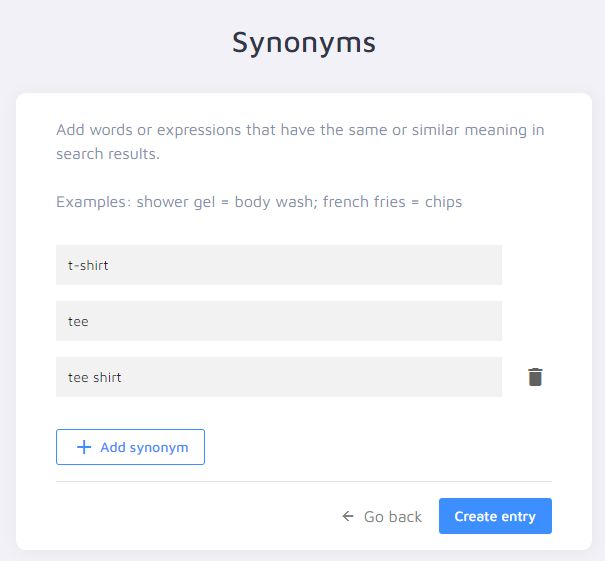
If multiple terms on your site share the same meaning, set up synonyms so a search for one term also returns pages using the others.
Click Add synonym set, choose Synonyms, and add one synonym per line. When you're done, click Create entry to save the connection.
Synonyms are bidirectional: every page mentioning "tee" will also be found for "t-shirt".
Alternate Spellings
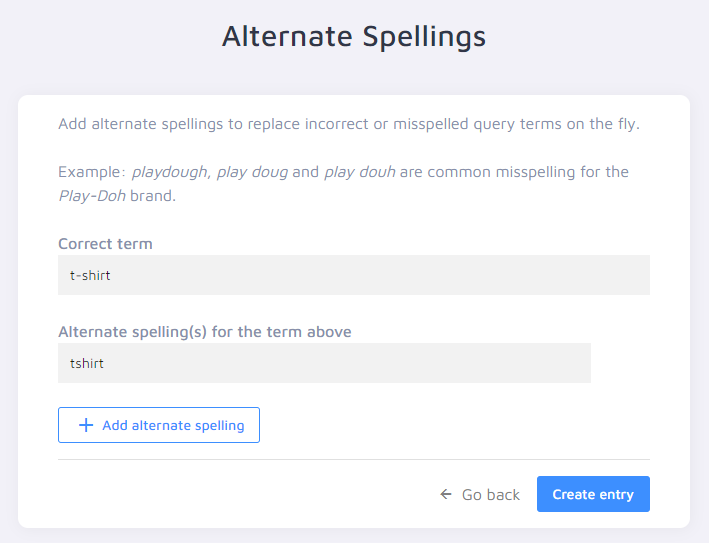
If you notice in your Dashboard Analytics that some queries return 0 results due to misspelling, set up alternate spellings.
Click Add synonym set, choose Alternate Spellings, and define a "Correct term" as well as the alternate spelling(s). Click Create entry to save the connection.
Alternate Spellings connections are unidirectional: when you search for "tshirt", you find pages mentioning "t-shirt". But when you search for "t-shirt" specifically, pages only mentioning "tshirt" are not found. The alternate spelling is rewritten to the correct spelling when performing a search.
Custom Dictionaries for Unsupported Languages
If the language used on your website isn't one of the languages natively supported by Site Search 360 (Czech, Danish, Dutch, English, Finnish, French, German, Greek, Hungarian, Italian, Latvian, Lithuanian, Norwegian, Portuguese, Romanian, Russian, Spanish, Swedish, Turkish), you can set the project language to English and define your own dictionary for common misspellings, plural forms, alternative spellings, and more.
Synonyms and Alternate Spellings Aren't Applied to Full-Page Content
When Site Search 360 extracts content from a page, it doesn't necessarily enrich all extracted text with Dictionary logic.
If a page contains a lot of text, terms that appear further down the page may fall outside the indexed text limit. In that case, synonym or alternate spelling connections may not be applied to those terms — which can lead to searches not returning a page even though a synonym appears somewhere in its content.
The indexed text limit depends on your plan:
- 2,500 characters — Free Plan
- 5,000 characters — Columbo Plan
- 15,000 characters — Holmes Plan
- 30,000 characters — Batman Plan, Custom Plan, and Trial Plan
If you suspect this is happening, try moving the relevant term closer to the top of the page (within the first characters listed above) and then fully re-index your site.