Google Sitelinks Searchbox
You can enable users to search your website directly from Google search results using Google's Sitelinks Searchbox.
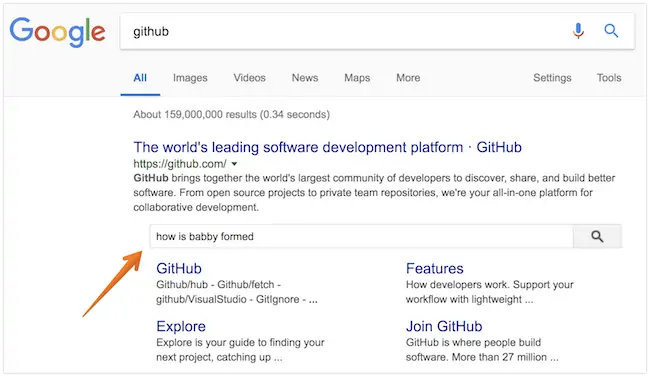
Add the following script to your home page. Next time Google crawls your site it will interpret the script and show the Sitelinks Searchbox:
<script type="application/ld+json">
{
   "@context": "http://schema.org",
   "@type": "WebSite",
   "url": "https://example.com/",
   "potentialAction": {
      "@type": "SearchAction",
      "target": {
         "@type": "EntryPoint",
         "urlTemplate": "https://example.com/search?ss360Query={search_term_string}"
      },
      "query-input": "required name=search_term_string"
   }
}
</script>
- Replace
https://example.com/with your website URL and update thetargetparameter to match your search URL pattern. - Make sure the query parameter name matches
results.searchQueryParamNamein yourss360Config— the default isss360Query.
To test, replace search_term_string with a test query and open the URL in a browser. For example: https://www.site.com/search/?ss360Query=pizza