Page Boosting
You have a lot of pages on your website, but it is likely that not all pages are equally important. Maybe you put a lot of work into your blog posts, and you want these pages to rank higher in your search results than, say, answers in your FAQ.
Page Boosting is available on every plan. To order products in ecommerce search, see Ranking Strategies instead.
There are a few ways to boost certain pages in your search results so they rank higher than other pages. These options are available under Ranking Strategies → Page Boosting.

Using Numeric Data Points for Boosting
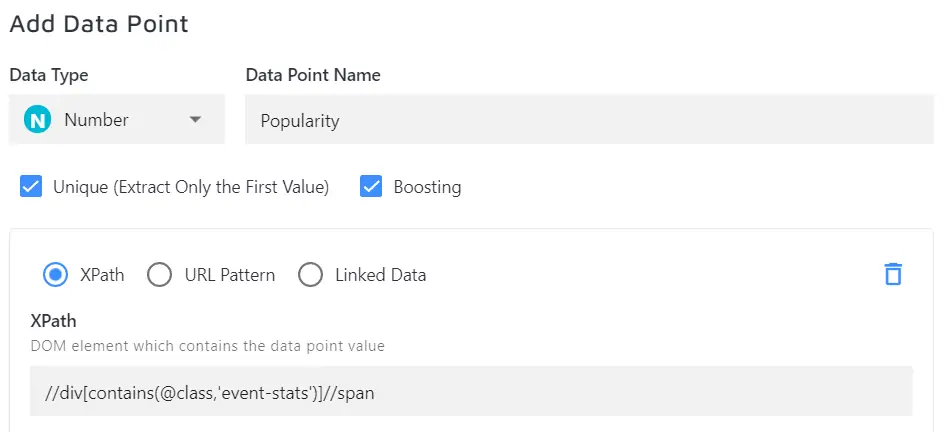
For example, let's assume that your users give "likes" to your articles or products. You can create a "Popularity" data point and boost the pages that have more upvotes. To do so:
-
Create a data point and tell the crawler where to find the information about the number of likes on the page. You can source this information from a meta tag or even a hidden HTML element on your pages. Use XPaths to point the crawler to the right element.
-
You will see the following options for every numeric data point you create:
- Unique - check it to only extract one value per page, recommended for boosting.
- Boosting - check it to be able to use the data point for boosting.
-
Now, set Page Boosting to "Use numeric data point" with the corresponding data point name.

Using URL Patterns for Boosting
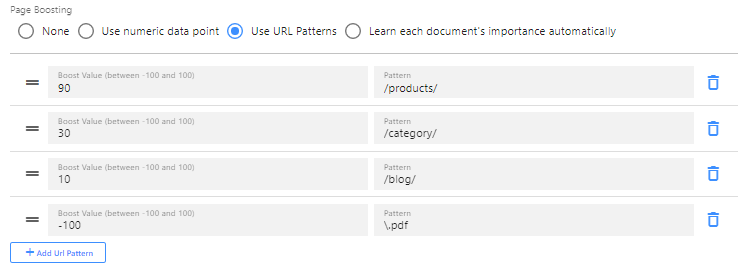
URL pattern boosting works in "levels". Even though you can set any value between -100 and 100, it is advisable to use levels of 10 (20, 30, etc.)
Example: you can boost your /products/ by 90, /category/ by 30, and /blog/ by 10. The higher the boosting score, the more priority is given to the respective results.
In practice, if you type in a search query, the matching results under /products/ come up above /blog/ results, even when you have a blog post that is a very good match to your query (for example, one with the exact same title). This happens because you have boosted products so much higher than your blog.
Boosting happens more or less independently of how well the query matches (although the query relevance does still play a role, especially for smaller boosting levels such as 1, 2, etc.)
You can also downrank or "penalize" certain results by setting the value to a negative number. If, for example, your PDF files come up higher than any other type of search result and you want them to come up last, try -100 as the boosting value and \.pdf as the URL pattern to lower default PDF ranking.
Learning Each Document's Importance Automatically
Set your boosting strategy to Learn each document's importance automatically to have Site Search 360 determine the importance of each document based on a combination of:
- the
<priority>tag values set in your sitemap, and - user interactions such as clicks and conversions.
Conversions and interactions are only reflected when the AI Optimization feature is enabled in your plan. Without it, document importance is based on your sitemap <priority> tag values alone.