Callbacks & Hooks
Callbacks let you hook into the Site Search 360 JS plugin at specific points — before and after a search, before and after rendering, when suggestions update, and during plugin startup — to inspect or modify data, customize templates, or take over rendering.
Edit these in Design & Publish under the Advanced tab. The Advanced tab has four collapsible groups: Callbacks, Renderers, Result Template, and Suggestions Template (the Renderers group appears only on plugin version 15).
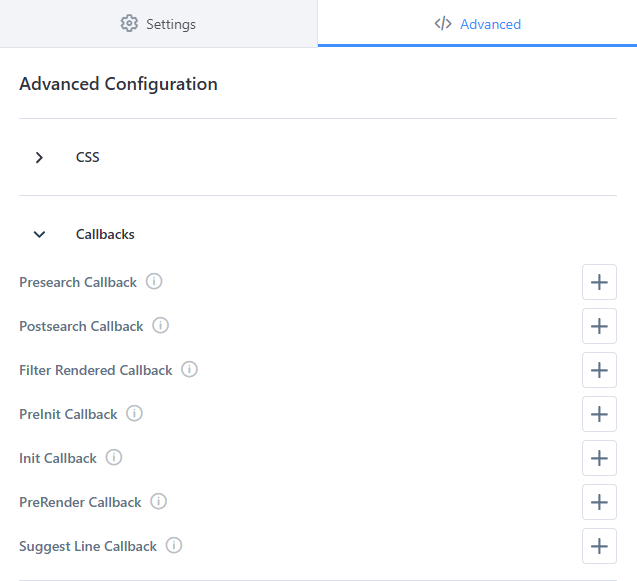
This article covers the first two groups — the plugin-level Callbacks and the Renderers hooks — both of which live on ss360Config.callbacks. The Result Template and Suggestions Template groups, including their own template callbacks, are covered in the Templates article.
Callbacks are read once at plugin initialization. Reassigning a callback on ss360Config.callbacks after the plugin has initialized has no effect — the plugin caches the references at startup. Define all callbacks before the plugin loads.
Callbacks
These callbacks run on ss360Config.callbacks. The first group is exposed in the Advanced UI in this order; the second group is available in the config but not surfaced as fields in the Advanced tab.
Several callbacks receive the Search API response. Its shape differs between callbacks — see Search API response structure for the full reference and the per-callback notes for what each one actually exposes.
Presearch Callback (preSearch)
preSearch runs immediately before a search request is executed — for example, when a visitor submits a query or selects a suggestion. Use it to inspect or validate the query, or to cancel the search entirely before any request is sent.
ss360Config.callbacks.preSearch = function(query) { /* your code here */ };
Arguments:
query— (String) the search query that is about to be executed.
The plugin passes additional arguments after query: the active sort, the search-box object, the active filters, and the show-results configuration — preSearch = (query, sort, searchBox, filters, config) => {}. Most integrations only need query, but the later arguments are available if you need the surrounding search context.
Return value
Unlike other callbacks, the return value of preSearch controls whether the search proceeds:
- Returning
false(or any falsy value) cancels the search — no request is sent. - Returning
true, or omitting a return value, allows the search to continue normally.
preSearch is evaluated synchronously. Returning a Promise will not cancel or delay the search — a Promise object is always truthy. Any logic that decides whether to cancel must complete before the function returns.
Example — enforcing a minimum query length
ss360Config.callbacks.preSearch = function(query) {
    const trimmed = (query || '').trim();
    if (trimmed.length < 2) {
        const hint = document.querySelector('.search-hint-message');
        if (hint) {
            hint.textContent = 'Please enter at least 2 characters to search.';
        }
        return false; // cancel the search
    }
    return true; // allow the search to proceed
};
This pattern works for any condition-based gate: minimum query length, a required filter being selected, blocking disallowed terms, or redirecting certain queries to a different page.
Postsearch Callback (postSearch)
postSearch runs after a search executes and before filters are rendered. It fires after every query — including when a filter or sorting option is selected — but not on pagination. It receives the Search API response.
ss360Config.callbacks.postSearch = function(data) { /* your code here */ };
postSearch fires even when searchResult is also defined. In that case, searchResult fires first, then postSearch fires with the same data. You can use both together — for example, searchResult for custom rendering and postSearch for analytics.
The data object in postSearch includes fields not present in preRender, such as: interpretedQuery, offset, limit, matchedIntentId, answerText, suggestedFilters, activePreSetFilterOptions, activeSxFilterOptions, activeGuidedQuestionsFilters, filterGroups, sxFilterOptions, and activeRanking.
Avoid ID selectors inside this callback. IDs break when a configuration is renamed or duplicated, and they won't match on landing-page searches, which render results into a different container instance. Use class selectors instead — the results container is always available as .ss360-list.
Example — updating a results summary and no-results state
.ss360-results-summary and .ss360-no-results are class names you define in your own page markup — SS360 does not generate these elements automatically. Add them to your HTML wherever you want the summary and no-results message to appear.
ss360Config.callbacks.postSearch = function(data) {
    const query = data.interpretedQuery ? data.interpretedQuery.original : data.query;
    const count = data.totalResults;

    const summary = document.querySelector('.ss360-results-summary');
    if (summary) {
        summary.textContent = count > 0
            ? `Showing ${count} result${count === 1 ? '' : 's'} for "${query}"`
            : `No results found for "${query}"`;
    }

    const noResultsMessage = document.querySelector('.ss360-no-results');
    if (noResultsMessage) {
        noResultsMessage.style.display = count > 0 ? 'none' : 'block';
    }
};
Example — sending a search analytics event
ss360Config.callbacks.postSearch = function(data) {
    if (typeof window.dataLayer === 'undefined') return;

    window.dataLayer.push({
        event: 'site_search_results',
        searchTerm: data.interpretedQuery ? data.interpretedQuery.original : data.query,
        resultCount: data.totalResults
    });
};
Filter Rendered Callback (filterRendered)
filterRendered runs after a search executes and after the filters are rendered on the page. Use it to enhance or inspect the rendered filter UI.
ss360Config.callbacks.filterRendered = function() { /* your code here */ };
Avoid ID selectors inside this callback. IDs break when a configuration is renamed or duplicated, and they won't match on landing-page searches. Use class selectors instead — filter groups are rendered with predictable classes such as .ss360-filter__group.
Example — adding accessibility semantics to filter groups
ss360Config.callbacks.filterRendered = function() {
    const filterGroups = document.querySelectorAll('.ss360-filter__group');

    filterGroups.forEach((group) => {
        const toggleButton = group.querySelector('.ss360-filter__button');
        const isActive = group.classList.contains('ss360-filter__group--active');
        if (toggleButton) {
            toggleButton.setAttribute('aria-expanded', isActive ? 'true' : 'false');
        }
    });
};
PreInit Callback (preInit)
preInit runs before the plugin initializes. It receives the resolved configuration object, so you can inspect or adjust configuration before the plugin builds the UI.
ss360Config.callbacks.preInit = (config) => { /* your code here */ };
Arguments:
config— (Object) the resolved plugin configuration.
preInit may return a Promise. When it does, the plugin waits for the promise to resolve before initializing — useful for asynchronous setup that must complete before the first render.
Init Callback (init)
init runs once the plugin has finished initializing. Use it to run setup logic that depends on the plugin being ready.
ss360Config.callbacks.init = () => { /* your code here */ };
init is loosely typed in the plugin (a plain function). Confirm the exact arguments and timing in your own integration before building logic that depends on them.
PreRender Callback (preRender)
preRender runs before search results are rendered. The first argument is the suggests property of the Search API response, and the second argument is the entire Search API response. You can modify either object and the changes are reflected in the rendered output.
ss360Config.callbacks.preRender = (suggests, data) => {};
The data object in preRender includes fields not present in postSearch or searchResult, such as: query, plain, redirect, banner, sorting, filterNameMapping, groupedResultsAvailable, plan, attribution, queryCorrection, and queryCorrectionRewrite.
Suggest Line Callback (suggestLine)
suggestLine fires for each item rendered in the autocomplete dropdown (the unibox). Both arguments are strings.
ss360Config.callbacks.suggestLine = (htmlString, groupLabel) => {
   // htmlString — the rendered HTML string for this suggestion item
   // groupLabel — the content group label, e.g. "Products", "Queries", "Categories"
};
suggestLine does not receive a suggest object or a DOM node. It fires in the autocomplete dropdown context only, with two plain strings. For full-results-page customization, use resultLine instead.
Additional config-only callbacks
These callbacks exist on ss360Config.callbacks and are fully supported, but the Advanced tab does not expose a field for them. Set them in your embed config.
Suggest Change Callback (suggestChange)
suggestChange is called whenever the search suggestions are updated.
ss360Config.callbacks.suggestChange = (suggestionsVisible, dataSets) => {};
suggestChange fires more than once per keystroke. It fires immediately with visible: false and a searchHistory dataset (often empty) before the debounced API call resolves, then fires again with visible: true and a resultGroup dataset once real suggestions arrive. Write your handler to handle multiple calls per keystroke.
The dataSets argument is an array of retrieved data sets with the following structure:
{
   type: 'resultGroup', // the data set type: resultGroup, searchHistory, or dataSet
   data: [
      {
         title: 'My Result',
         link: 'https://myresult.com',
         image: 'https://placekitten.com/300/200',
         contentGroup: 'Blog',
         dataPoints: [
            { key: 'Price', value: '$15', show: true }
         ]
      }
   ]
}
Result Line Callback (resultLine)
resultLine fires for each item rendered on the full search results page. It receives the result object and the rendered DOM node.
ss360Config.callbacks.resultLine = (suggest, node) => {};
/*
   Sample suggest object:
{
   link: 'https://myresult.com',
   name: 'My Result',
   image: 'https://myresult.com/image.jpg',
   content: 'I am the search snippet',
   type: 'HTML', // either HTML, CUSTOM, or YOUTUBE_VIDEO
   html: undefined, // only for CUSTOM results
   dataPoints: [
      { key: 'Price', value: '$15', show: true }
   ],
   identifier: undefined // the article number (ecom search only)
}
*/
node here is a genuine HTMLElement — no unwrapping needed. This is different from the node argument in a template's postRenderCallback (see Templates), which is a wrapped collection accessed with node[0].
Results Preloaded Callback (resultsPreloaded)
resultsPreloaded is intended to fire after a page of search results is preloaded and appended to the DOM — for example, after the More Results button is clicked. It receives the Search API response.
ss360Config.callbacks.resultsPreloaded = (data) => {};
The exact trigger condition for resultsPreloaded is not fully confirmed. Testing with results.infiniteScroll: true and button-click pagination did not produce reliable firing. Confirm behavior in your own integration before building logic that depends on this callback, and contact support if you cannot get it to fire.
For pagination scenarios, the plugin also exposes moreResults (fires when more results are requested) and preloadedResultsRendered (fires after preloaded results are rendered). Test which one fits your use case.
Search Result Callback (searchResult)
searchResult is called before search result cards are rendered. When defined, the plugin skips its default card rendering entirely — you are responsible for rendering the results yourself. It receives the Search API response.
ss360Config.callbacks.searchResult = (data) => {};
Enter Callback (enter)
enter fires when a visitor submits a search — a search-button click, a form submit, pressing Enter in the search box, or accepting a "did you mean" query correction. It receives the submitted query.
ss360Config.callbacks.enter = (query) => { /* your code here */ };
When enter is defined, it replaces the plugin's default search execution. If you only want to observe submissions (for analytics, for example), trigger the search yourself inside the callback, or use preSearch instead — otherwise defining enter stops results from loading.
Query Modification Callback (queryModification)
queryModification runs at the start of a search, before the request is sent. Return a string to rewrite the query.
ss360Config.callbacks.queryModification = (query, config) => {
    return query.replace(/\bfaq\b/i, 'help'); // return the modified query
};
Arguments:
query— (String) the query about to be searched.config— (Object) the show-results configuration for this search.
Return value: the string returned replaces the query. Return query unchanged to leave it as-is.
Pre-Suggest Callback (preSuggest)
preSuggest runs before autocomplete suggestions are requested as the visitor types. It is the autocomplete counterpart to preSearch.
ss360Config.callbacks.preSuggest = (query, searchBox) => {
    return query.length >= 2; // false cancels the suggestion request
};
Arguments:
query— (String) the current query in the search box.searchBox— (HTMLInputElement) the search box element.
Return value: return a falsy value to skip fetching and showing suggestions; return a truthy value to continue.
Redirect Callback (redirect)
redirect fires when a search result triggers a redirect (a redirect rule, or a single-result redirect). It receives the target URL.
ss360Config.callbacks.redirect = (redirectUrl) => { /* your code here */ };
When redirect is defined, it replaces the plugin's default navigation (window.location.href = redirectUrl). You are then responsible for performing the navigation yourself if you still want the redirect to happen.
No Results Loaded Callback (noResultsLoaded)
noResultsLoaded fires when a query returns no results. It fires for both full searches and autocomplete suggestions — the context argument tells you which.
ss360Config.callbacks.noResultsLoaded = (query, context, data) => {
    // context is SearchContext.SEARCH or SearchContext.SUGGESTIONS
    return false; // show the standard no-results state
};
Arguments:
query— (String) the query that returned no results.context— the search context (SEARCHorSUGGESTIONS).data— the response data.
Return value: the return value gates a fallback query. Return a falsy value to show the standard no-results state.
Search Error Callback (searchError)
searchError fires when a search API request returns an error status. It takes no arguments.
ss360Config.callbacks.searchError = () => { /* your code here */ };
Defining searchError also suppresses the plugin's default developer error message. Use it to log errors or show a custom message to visitors.
Enter Result Callback (enterResult)
enterResult fires when a visitor selects a result with a link in the autocomplete dropdown. Use it for click tracking.
ss360Config.callbacks.enterResult = (text, link, ctrlKey, query) => { /* your code here */ };
Arguments:
text— (String) the selected result's text.link— (String) the result's link.ctrlKey— (Boolean) whether Ctrl was held (open in new tab).query— (String) the query that produced the suggestion.
Add to Cart Callback (addToCart)
addToCart supports e-commerce result cards. When defined, the plugin renders an Add to cart call-to-action on product results and calls this callback when a visitor clicks it.
ss360Config.callbacks.addToCart = (identifier, suggest) => { /* your code here */ };
Arguments:
identifier— (String) the product's article number / identifier.suggest— (Object) the product result object.
Other lifecycle callbacks
These callbacks are also available on ss360Config.callbacks for UI, image, suggestion, and rendering lifecycle events. All are optional.
| Callback | Signature | Fires when | Return value |
|---|---|---|---|
navigationClick | (contentGroup) | a content-group navigation tab is clicked on the results page | ignored |
moreResults | (visibleCount, maxResultsCount, viewKey, data) | more results are loaded (More Results button, pagination, or back-navigation) | ignored |
type | (event, value) | a key is pressed in the search box | ignored |
focus | (event, query) | the search box gains focus | ignored |
blur | (event, query) | the search box loses focus | ignored |
resultImageError | (node) | a result image fails to load | return a string URL to use as the replacement image |
imageLoaded | (node, src) | a result image finishes loading | ignored |
suggestsLoaded | (blocks) | suggestion blocks have loaded | ignored |
suggestPreRender | (blocks) | after suggestion sources load, before suggestion blocks render | ignored |
suggestPostRender | () | after the suggestion box is rendered | ignored |
filterSearch | (filterId, query) | the visitor types in a multiselect filter's search box | return a string to override the filter search query |
singleResultPreRenderCallback | (suggest, variants) | before an individual result item is rendered | ignored |
preloadedResultsRendered | (data) | after a batch of preloaded results is rendered | ignored |
noResultsPageRendered | () | after the no-results page finishes rendering | ignored |
skeletonLoaderRendered | (layer) | after the skeleton loading placeholder is rendered | ignored |
zoeResultRendered | (node, data) | after a Zoe result node is rendered | ignored |
Renderers
The Renderers group provides advanced hooks for overriding how results are rendered at the class level, rather than through a template. This group appears in the Advanced tab only on plugin version 15. All renderer hooks live on ss360Config.callbacks.
The Result Template and Suggestions Template groups — the template markup, the templating syntax, and the template-scoped callbacks (preRenderCallback, templateBuiltCallback, postRenderCallback) — are documented in the Templates article.
Content Result Renderer (getContentResultRenderer)
getContentResultRenderer is an advanced hook that lets you override the plugin's built-in content result renderer class. It receives the base renderer class as its argument and must return a subclass.
ss360Config.callbacks.getContentResultRenderer = (superClass) => {
    return class extends superClass {
        // override rendering methods here
    };
};
Two sibling hooks follow the same pattern for other result types: getProductResultRenderer (product/ecom results) and getCustomResultRenderer (custom results). Each receives the base class and returns a subclass.
Overriding a renderer replaces internal rendering logic and is more involved than editing a template. For most customizations — reordering fields, adding markup, binding events — prefer a custom template and its callbacks; see Templates.
Search API response structure
Several callbacks — preRender, postSearch, searchResult, and resultsPreloaded — receive the search API response. Each callback exposes a subset of these fields; refer to each callback's notes for what is actually available.
Full response shape
{
   query: 'q', // the query (content search only)
   interpretedQuery: { // the query information (ecom search only)
      original: 'q', // the original query
      queryWasCorrected: false, // a boolean flag indicating whether a query correction was performed
      corrected: undefined // the corrected query
   },
   suggests: { // the search results, mapping of result group names to array of results (note: for ecom search a single result entry can be an array containing all resolved product variants)
      Blog: [
         {
            link: 'https://myresult.com',
            name: 'My Result',
            image: 'https://myresult.com/image.jpg',
            content: 'I am the search snippet',
            type: 'HTML', // either HTML, CUSTOM, or YOUTUBE_VIDEO
            html: undefined, // only for CUSTOM results
            dataPoints: [
               { key: 'Price', value: '$15', show: true }
            ],
            identifier: undefined // the article number (ecom search only)
         }
      ]
   },
   totalResultsPerContentGroup: { // a mapping of result group names to number of available results
      Blog: 4
   },
   activeFilterOptions: [
      {
         key: 'fid#2',
         name: 'Author',
         values: [ // only for multiselect filters
            {
               name: 'Exotic',
               value: 'exotic'
            }
         ],
         min: undefined, // the set min value, only for range filters
         max: undefined // the set max value, only for range filters
      }
   ],
   filterOptions: [
      {
         filterType: 'COLLECTION', // the filter type, COLLECTION, DATE, TREE, COLOR, BOOLEAN, RANGE (content search only)
         type: 'COLLECTION', // the filter type, COLLECTION, DATE, TREE, COLOR, BOOLEAN, RANGE (ecom search only)
         key: 'fid#2',
         name: 'Author',
         min: undefined, // for range filters
         max: undefined, // for range filters
         categories: [ // for tree filters (ecom search only)
            {
               conceptId: 'CONCEPT_ID',
               count: 4, // ecom search only
               key: '54979',
               name: 'Concept Name',
               value: 'ROOT/CONCEPT',
               viewName: 'Concept Name',
               children: []
            }
         ],
         values: [
            {
               key: 'Key',
               name: 'Name',
               value: 'Value', // ecom search only
               count: 1 // ecom search only
            }
         ], // for multiselect filters
         counts: { // a mapping of filter value to number of available results (available only for range filters with ecom search, and for all filters with content search)
            exotic: 4
         }
      }
   ],
   sortingOptions: [ // available sorting options (string array for content search, object array for ecom search)
      'Date (descending)',
      'Date (ascending)',
      {
         name: 'Preis',
         key: '4978',
         sort: 'DESC' // ASC or DESC
      }
   ],
   sorting: 'Date (descending)', // the active sorting option (content search only)
   sortingOrder: 'DESC', // the sorting order, ASC or DESC (content search only)
   activeSortingOption: { // the active sorting option (ecom search only)
      name: 'Preis',
      key: '4978',
      sort: 'DESC' // ASC or DESC
   },
   filterMapping: { // a mapping of result group names to array of filters that should be displayed for the given group (ecom search only)
      Products: ['54979']
   },
   redirect: undefined, // set for redirect mappings, the redirect url
   totalResults: 4 // number of all available results
}
Examples
Global callback placement
<script>
var ss360Config = {
   callbacks: {
      // Callbacks panel order
      preSearch: (query) => true,
      postSearch: (data) => {},
      filterRendered: () => {},
      preInit: (config) => {},
      init: () => {},
      preRender: (suggests, data) => {},
      // Autocomplete dropdown — both args are strings
      suggestLine: (htmlString, groupLabel) => {},
      // Full results page — suggest object + real DOM node
      resultLine: (suggest, node) => {},
      // Renderer override — receives the base class, returns a subclass
      getContentResultRenderer: (superClass) => class extends superClass {}
   }
};
</script>
For template callback placement (inside resultTemplate / suggestTemplate), see the Templates article.