Callbacks & Hooks
Callbacks let you hook into the Site Search 360 JS plugin at specific points (suggestions update, before/after rendering, after search, etc.) to modify data, customize templates, or take over rendering.
You can edit callbacks in Design & Publish under the Advanced tab.
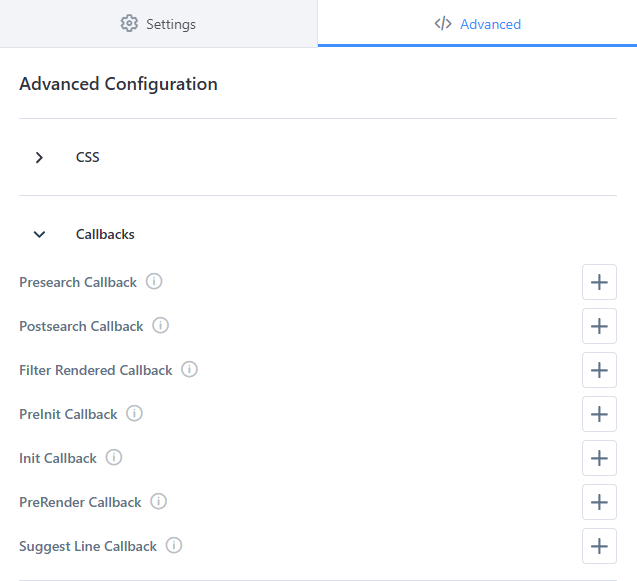
There are two callback areas:
- Templating callbacks (inside
suggestTemplate/resultTemplate) - Global plugin callbacks (inside
ss360Config.callbacks)
Templating callbacks
You can define templating callbacks inside:
ss360Config.suggestions.suggestTemplatess360Config.results.resultTemplate
preRenderCallback
The preRenderCallback is called before the template string is processed.
Arguments:
suggest- (Object) the full search result/suggestion object. Can be modified to set custom properties for the content interpolation.globalStore- (Object) the store that's shared across all search results/suggestions. Can be used to set global variables, e.g. result counter.contentGroup- (String) the content group name.
templateBuiltCallback
The templateBuiltCallback is called after the template is built (all templating rules were applied), but before it was converted to a DOM Node.
Arguments:
template- (String) the string template.suggest- (Object) the full search result/suggestion object.globalStore- (Object) the store that's shared across all search results/suggestions. Can be used to set global variables, e.g. result counter.contentGroup- (String) the content group name.
This can be useful to do more complex replacements on the template string.
postRenderCallback
The postRenderCallback is called after the DOM Node has been created.
Arguments:
node- (Node) the DOM node.suggest- (Object) the full search result/suggestion object.globalStore- (Object) the store that's shared across all search results/suggestions. Can be used to set global variables, e.g. result counter.contentGroup- (String) the content group name.
This can be useful to bind custom events on search results/suggestions.
Global plugin callbacks
Some callbacks receive the (slightly modified) search API response or other complex data as arguments.
Search API Response structure
The search API response has the same structure for all callbacks:
{
   query: 'q', // the query (content search only)
   interpretedQuery: { // the query information (ecom search only)
      original: 'q', // the original query
      queryWasCorrected: false, // a boolean flag indicating whether a query correction was performed
      corrected: undefined // the corrected query
   },
   suggests: { // the search results, mapping of result group names to array of results (note: for ecom search a single result entry can be an array containing all resolved product variants)
      Blog: [
         {
            link: 'https://myresult.com',
            name: 'My Result',
            image: 'https://myresult.com/image.jpg',
            content: 'I am the search snippet',
            type: 'HTML', // either HTML, CUSTOM, or YOUTUBE_VIDEO
            html: undefined, // only for CUSTOM results
            dataPoints: [
               { key: 'Price', value: '$15', show: true }
            ],
            identifier: undefined // the article number (ecom search only)
         }
      ]
   },
   totalResultsPerContentGroup: { // a mapping of result group names to number of available results
      Blog: 4
   },
   activeFilterOptions: [
      {
         key: 'fid#2',
         name: 'Author',
         values: [ // only for multiselect filters
            {
               name: 'Exotic',
               value: 'exotic'
            }
         ],
         min: undefined, // the set min value, only for range filters
         max: undefined // the set max value, only for range filters
      }
   ],
   filterOptions: [
      {
         filterType: 'COLLECTION', // the filter type, COLLECTION, DATE, TREE, COLOR, BOOLEAN, RANGE (content search only)
         type: 'COLLECTION', // the filter type, COLLECTION, DATE, TREE, COLOR, BOOLEAN, RANGE (ecom search only)
         key: 'fid#2',
         name: 'Author',
         min: undefined, // for range filters
         max: undefined, // for range filters
         categories: [ // for tree filters (ecom search only)
            {
               conceptId: 'CONCEPT_ID',
               count: 4, // ecom search only
               key: '54979',
               name: 'Concept Name',
               value: 'ROOT/CONCEPT',
               viewName: 'Concept Name',
               children: []
            }
         ],
         values: [
            {
               key: 'Key',
               name: 'Name',
               value: 'Value', // ecom search only
               count: 1 // ecom search only
            }
         ], // for multiselect filters
         counts: { // a mapping of filter value to number of available results (available only for range filters with ecom search, and for all filters with content search)
            exotic: 4
         }
      }
   ],
   sortingOptions: [ // available sorting options (string array for content search, object array for ecom search)
      'Date (descending)',
      'Date (ascending)',
      {
         name: 'Preis',
         key: '4978',
         sort: 'DESC' // ASC or DESC
      }
   ],
   sorting: 'Date (descending)', // the active sorting option (content search only)
   sortingOrder: 'DESC', // the sorting order, ASC or DESC (content search only)
   activeSortingOption: { // the active sorting option (ecom search only)
      name: 'Preis',
      key: '4978',
      sort: 'DESC' // ASC or DESC
   },
   filterMapping: { // a mapping of result group names to array of filters that should be displayed for the given group (ecom search only)
      Products: ['54979']
   },
   redirect: undefined, // set for redirect mappings, the redirect url
   totalResults: 4 // number of all available results
}
Suggest Change Callback
This callback is called whenever the search suggestions are updated.
ss360Config.callbacks.suggestChange = (suggestionsVisible : boolean, dataSets : Array<SuggestionDataSet>) => {};
The dataSets argument is an array of retrieved data sets with the following structure:
{
   type: 'resultGroup', // the data set type (resultGroup, searchHistory, or dataSet)
   data: [
      {
         title: 'My Result',
         link: 'https://myresult.com'
         image: 'https://placekitten.com/300/200',
         contentGroup: 'Blog',
         dataPoints: [
            { key: 'Price', value: '$15', show: true }
         ]
      }
   ]
}
Pre-Render Callback
This callback is called before a search result is rendered. The first argument is the suggests property of the Search API Response, and the second argument is the entire Search API Response. You can perform modifications on any of those objects and the changes will be reflected in the rendered content.
ss360Config.callbacks.preRender = (suggests : Suggests, data : SearchApiResponse) => {};
Result Line Callback
This callback is called after a DOM element for a single search result has been created. It receives the single result object, and the rendered DOM node as arguments.
ss360Config.callbacks.suggestLine = (suggest : Suggest, node : HTMLElement) => {};
/*
   Sample Suggest Data:
{
   link: 'https://myresult.com',
   name: 'My Result',
   image: 'https://myresult.com/image.jpg',
   content: 'I am the search snippet',
   type: 'HTML', // either HTML, CUSTOM, or YOUTUBE_VIDEO
   html: undefined, // only for CUSTOM results
   dataPoints: [
      { key: 'Price', value: '$15', show: true }
   ],
   identifier: undefined // the article number (ecom search only)
}
*/
Results Preloaded
This callback is called after a page of search results is preloaded and appended to the DOM, e.g. after the More Results button is clicked. It receives the Search API Response.
ss360Config.callbacks.resultsPreloaded = (data : SearchApiResponse) => {};
Post Search Callback
This callback is called after a search query is executed (including a filter or sorting option being selected). It is not called on pagination. This callback receives the Search API Response.
ss360Config.callbacks.postSearch = (data : SearchApiResponse) => {};
Search Result Callback
This callback is called before the search results are rendered. If it is set, the plugin won't render the search result cards. You can use this callback to render the search results yourself. It receives the Search API Response as an argument.
ss360Config.callbacks.searchResult = (data : SearchApiResponse) => {};
Examples
Templating callback placement
<script>
var ss360Config = {
   results: {
      resultTemplate: {
         template: '<article>{{name}}</article>',
         preRenderCallback: (suggest, globalStore, contentGroup) => {},
         templateBuiltCallback: (template, suggest, globalStore, contentGroup) => template,
         postRenderCallback: (node, suggest, globalStore, contentGroup) => {}
      }
   }
};
</script>
Global callback placement
<script>
var ss360Config = {
   callbacks: {
      postSearch: (data) => {},
      preRender: (suggests, data) => {},
      suggestChange: (suggestionsVisible, dataSets) => {}
   }
};
</script>